Collections API in Kotlin with Examples.
April 14, 2025
Lorem Ipsum is simply dummy text sh hajkh jjaj
June 14, 2025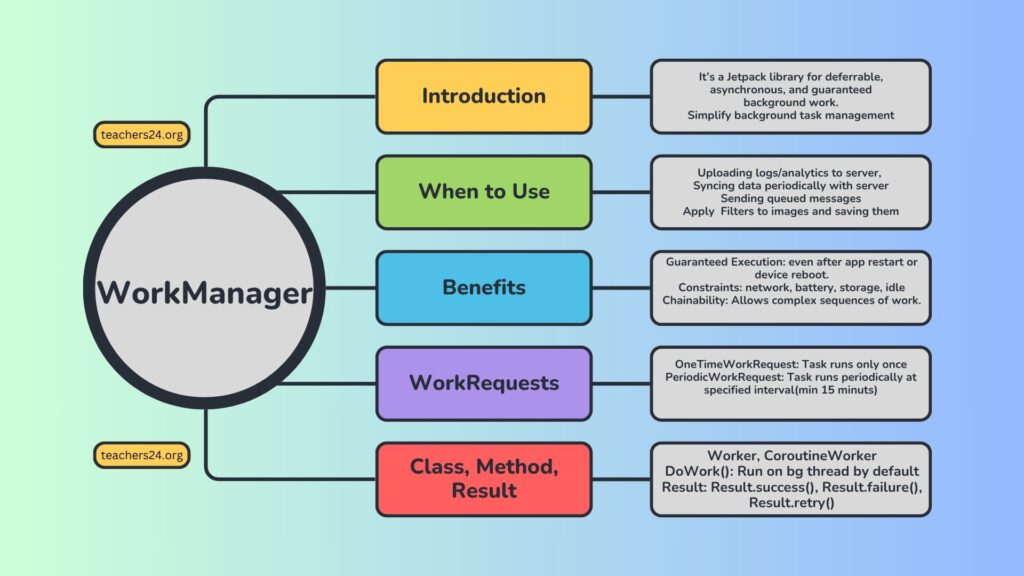
1. What is WorkManager and why was it introduced?
Answer: It’s a Jetpack library for deferrable, asynchronous, and guaranteed background work. It was introduced to simplify background task management and handle various OS restrictions (Doze, App Standby, etc.) across different Android versions, providing a single, consistent API.
2. When should you use WorkManager? Give a few use cases.
Answer: For tasks that need to run reliably even if the app exits or the device restarts. Examples:
- Uploading logs/analytics to a server.
- Syncing data periodically with a backend.
- Applying filters to images and saving them.
- Sending queued messages.
3. What are the key benefits of using WorkManager?
Answer:
- Guaranteed Execution: Ensures tasks run, even after app restart or device reboot.
- Constraints: Allows defining conditions (network, battery, storage, idle).
- Compatibility: Handles different OS versions (uses JobScheduler, AlarmManager, etc., internally).
- Chainability: Allows complex sequences of work.
E.g. Let’s say every hour the server is updated with new high quality images. Whenever we open our custom gallery app we should see almost synced data from the server.
Write following work requests in chain to happen in background.
Download -> Decompress -> Apply filter -> Save locally.
If not urgent do it on unmetered network type(Wifi or Broadband)
- Observability: Provides LiveData/Flow to observe work status.
- Simplified API: Abstraction over complex platform APIs.
4. What is a Worker class? How do you define a unit of work in WorkManager?
Answer: A Worker is an abstract class you extend to define the actual background task. You override the doWork() method, which runs on a background thread provided by WorkManager.
5. Explain the Result types that doWork() can return.
Answer:
- Result.success(): Work completed successfully.
- Result.failure(): Work failed and should not be retried.
- Result.retry(): Work failed and should be retried later, according to its backoff policy.
6. What are WorkRequests? What are the two main types?
Answer: WorkRequest defines how and when your work should run.
- OneTimeWorkRequest: For tasks that run once.
- PeriodicWorkRequest: For tasks that repeat at a specified interval (minimum 15 minutes).
7. How do you enqueue a WorkRequest?
Answer: Using WorkManager.getInstance(context).enqueue(workRequest).
8. Explain WorkManager’s Constraints. Give examples of common constraints.
Answer: Constraints define the conditions that must be met for a WorkRequest to execute. Examples:
- NetworkType: CONNECTED, UNMETERED, NOT_REQUIRED, METERED, TEMPORARILY_UNMETERED.
- setRequiresCharging(true): Device must be charging.
- setRequiresDeviceIdle(true): Device must be idle.
- setRequiresBatteryNotLow(true): Battery must not be low.
- setRequiresStorageNotLow(true): Storage must not be low.
9. How do you pass input data to a Worker and retrieve output data from it?
Answer:
- Input: Use Data objects with setInputData(data) when building the WorkRequest. Inside the Worker, retrieve it using getInputData().
- Output: Return Result.success(outputData) from doWork(). The output can be observed from the WorkInfo.
10. Describe Work Chaining. When would you use it?
Answer: Work chaining allows you to define a sequence or graph of WorkRequests where the output of one task can become the input of the next. Use cases:
- Download image -> Apply filter -> Upload.
- Cleanup old data -> Sync new data.
- beginWith(), then(), enqueue() are common methods. beginUniqueWork() is also important for unique chains.
11. How do you handle retries in WorkManager? Explain the backoff policy.
Answer: If doWork() returns Result.retry(), WorkManager will re-schedule the task based on its retry policy.
- Backoff Policy: LINEAR (retry interval increases linearly) or EXPONENTIAL (retry interval doubles).
- Backoff Delay: Minimum 10 seconds. You can set it using setBackoffCriteria().